 Continue with Discord
Scope and review status
The original community article describes extracting ESP32 flash from a Yoto Mini v2 (2023). It involves opening the player and soldering. It is not a firmware update, a battery-repair procedure or instructions for every Mini revision.
This November 2026 editorial review checked the ESP32 bootloader and read-flash command against Espressif documentation and the parser operations against Tenable's repository. A matching Mini board was not available for a new physical test. The original header orientation and power wiring are therefore not presented here as a verified wiring recipe. Stop if your board revision or connection points differ.
Identify and prepare
Record the player model, board revision, chip markings and tool versions before any work. Follow Yoto's model-specific service information for opening and battery handling. Disconnect power before soldering. A competent hardware technician should establish the board's power and UART connections from its actual circuitry; do not infer header pins from the orientation of a photograph.
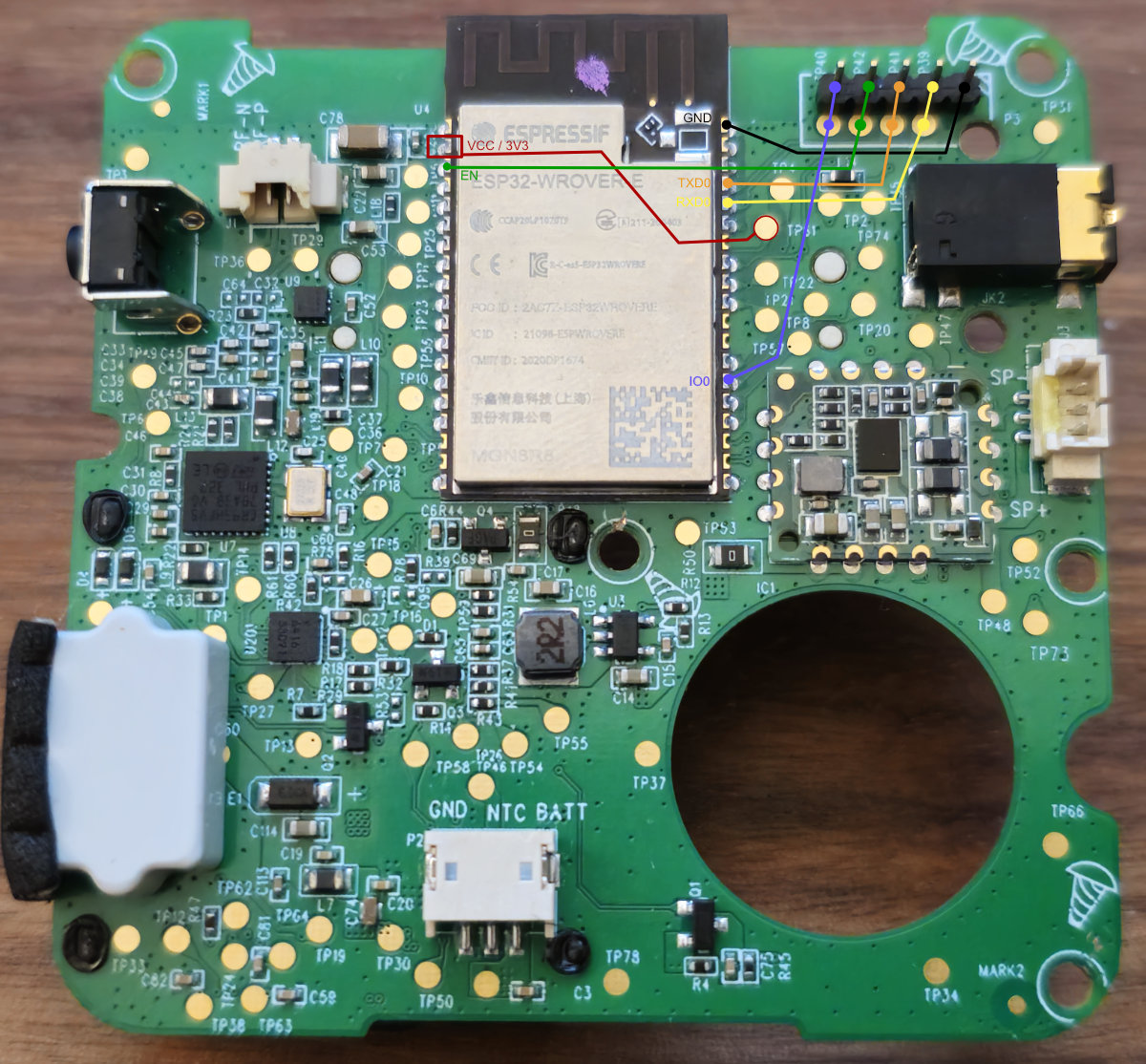
The original photographs and reported pin mapping remain in the pinned source article. They are historical observations, not evidence that a different board uses the same wiring.
Read flash after independently verifying the connection
Espressif documents GPIO0 low during reset for serial bootloader entry. Use its boot mode guide for the chip and basic commands for your installed esptool version.
For current esptool syntax, replace PORT with the verified serial device:
esptool --port PORT flash-id
esptool --port PORT read-flash 0 ALL mini-v2-first.bin
esptool --port PORT read-flash 0 ALL mini-v2-second.bin
shasum -a 256 mini-v2-first.bin mini-v2-second.bin
Compare the file lengths and SHA-256 values from two reads before treating the capture as reliable. Keep both captures private: firmware dumps can contain device identifiers or credentials. Security configuration can restrict reading; do not force past an unexplained error. These examples do not erase or write flash.
Inspect a working copy
Tenable's ESP32 image parser documents partition inspection and ELF reconstruction. Work on a copy and record the parser revision. The old article required several parser patches; do not silently assume that old patch set applies to a newer checkout.
python3 esp32_image_parser.py show_partitions mini-v2-first.bin
Choose a partition only after inspecting the actual table. Do not assume ota_0 or ota_1 exists or that an encrypted image can be reconstructed. Any later ELF analysis should retain the device/model and capture provenance with its results.